
How to Calculate Billable Hours for Freelancers
Learn how to calculate billable hours for freelancers with simple formulas, examples, time-tracking tips, and common billing mistakes.
Calcifyai Team
Expert calculators & financial tools
Billable hours are the hours a freelancer spends working on tasks that can be charged to a client. Knowing how to calculate billable hours helps freelancers create accurate invoices, set fair rates, track project costs, and understand how much of their working time generates income.
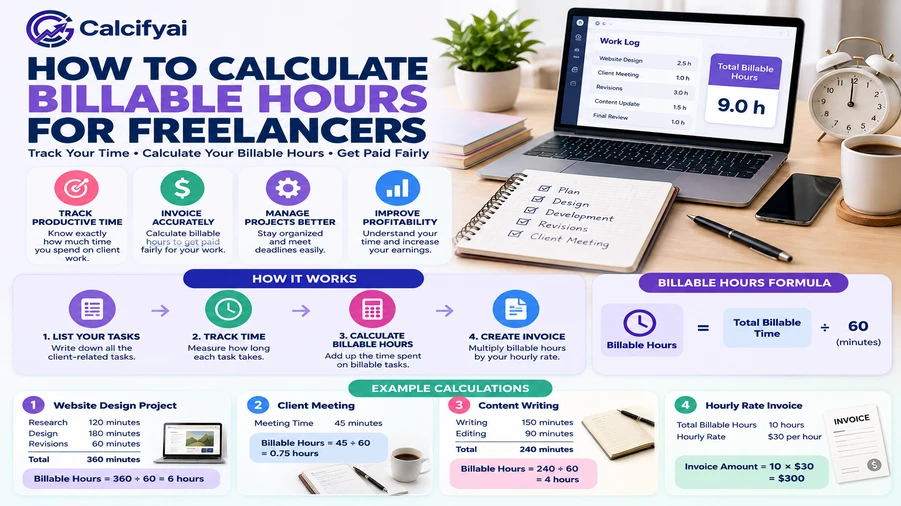
To calculate billable hours, add up the time spent on client-approved tasks, subtract unpaid breaks and non-billable activities, and convert the remaining time into hours. Multiply your billable hours by your hourly rate to calculate the labor cost.
For example, if you work 8 hours on a project but spend 1 hour on administrative tasks that you do not charge for, you have 7 billable hours. At a rate of $50 per hour, your billable labor total is $350.
What Are Billable Hours?
Billable hours are the time you can charge a client for under your agreement. They usually include work directly related to a client's project, such as writing, designing, coding, editing, research, or attending project meetings.
Non-billable hours are time spent on activities you do not charge to a client. These may include finding new clients, sending general marketing emails, managing your own finances, or learning new skills.
The distinction depends on your contract. Some clients may agree to pay for project meetings or research, while others may not.
Billable vs. Non-Billable Hours
Billable activities | Non-billable activities |
|---|---|
Writing a client's blog post | Searching for new clients |
Designing a client's website | Updating your own portfolio |
Coding a client feature | Managing general business expenses |
Client-approved project meetings | General networking |
Research required for a paid project | Learning unrelated new skills |
Always clarify which activities are billable before starting a project. This helps prevent misunderstandings when you send your invoice.
How to Calculate Billable Hours
Use this simple formula:
Billable Hours = Total Work Time − Non-Billable Time
If you track time in minutes, convert the result into hours by dividing the total billable minutes by 60.
Step 1: Record Your Total Work Time
Track the time you spend working during the day. Record your start and end times or use a timer for each task.
For example, suppose you work from 9:00 AM to 5:00 PM, with a 1-hour lunch break.
Total time between start and finish: 8 hours
Lunch break: 1 hour
Actual working time: 7 hours
Step 2: Separate Billable and Non-Billable Tasks
Review your work and identify which tasks are covered by your client agreement.
Suppose your 7 working hours include:
Writing a client article: 3 hours
Editing client content: 2 hours
Sending your own invoices: 30 minutes
Marketing your freelance services: 1 hour
Client project updates: 30 minutes
If the client has agreed to pay for the article, editing, and project updates, your billable time is 5.5 hours. The remaining 1.5 hours are non-billable.
Step 3: Convert Minutes Into Decimal Hours
Invoices commonly use decimal hours rather than hours and minutes.
Divide the number of minutes by 60.
Time | Decimal hours |
|---|---|
15 minutes | 0.25 |
30 minutes | 0.50 |
45 minutes | 0.75 |
1 hour 15 minutes | 1.25 |
1 hour 30 minutes | 1.50 |
2 hours 45 minutes | 2.75 |
For example, 2 hours and 30 minutes equals 2.5 hours, not 2.30 hours. The decimal portion represents a fraction of an hour.
Step 4: Calculate Your Billable Amount
Once you know your billable hours, multiply them by your hourly rate.
Billable Amount = Billable Hours × Hourly Rate
For example:
Billable time: 5.5 hours
Hourly rate: $40
Total labor charge: 5.5 × $40 = $220
This amount represents labor charges before any applicable taxes, expenses, discounts, or other contract terms.
How to Track Billable Hours Consistently
Calculating billable hours is only useful if your time records are accurate. A simple tracking system can help you avoid forgotten tasks and make invoicing easier.
Choose a Time-Tracking Method
You can track billable hours with:
A spreadsheet: Create columns for the date, client, project, task, duration, and billable status.
A timer app: Start and stop a timer as you move between tasks.
A work-hours calculator: Calculate time between start and end times, including breaks.
A manual time log: Record each work session in a notebook or document.
For freelancers who work on several projects, a timer or spreadsheet organized by client can make it easier to review hours before invoicing.
Record Time by Client and Task
Avoid recording an entire day as one vague entry such as “client work.” Instead, separate tasks so you can explain the time on an invoice.
Date | Client | Task | Time | Billable? |
|---|---|---|---|---|
Monday | Client A | Website design | 2.5 hours | Yes |
Monday | Client B | Research and writing | 3 hours | Yes |
Monday | Own business | Invoicing | 0.5 hours | No |
Monday | Client A | Project meeting | 1 hour | Yes, if agreed |
This level of detail makes it easier to catch errors and answer questions about your invoice.
Review Your Time Log Before Invoicing
At the end of each day or week, check your entries. Confirm that each task is assigned to the right client, the duration is correct, and the work is covered by your agreement.
Also check your billing increment. Some freelancers invoice in exact minutes, while others use increments such as 6 or 15 minutes. Follow the rounding method agreed with your client, and avoid changing it after the work is completed.
For help converting time entries, see this guide on converting minutes to decimal hours.
How to Calculate Billable Hours for a Week
To calculate weekly billable hours, add the billable time from each workday. Do not include non-billable work or breaks that should not be counted.
Imagine a freelance designer tracks the following hours:
Day | Billable hours | Non-billable hours |
|---|---|---|
Monday | 5.5 | 2 |
Tuesday | 6 | 1.5 |
Wednesday | 4.5 | 3 |
Thursday | 7 | 1 |
Friday | 5 | 2 |
Weekly billable hours:
5.5 + 6 + 4.5 + 7 + 5 = 28 hours
Total working hours:
28 billable hours + 9.5 non-billable hours = 37.5 hours
The designer worked 37.5 hours in total and can invoice 28 hours, assuming all those tasks are billable under the client agreements.
Calculate Your Billable Percentage
Your billable percentage shows how much of your working time is spent on billable tasks.
Billable Percentage = (Billable Hours ÷ Total Work Hours) × 100
Using the example above:
(28 ÷ 37.5) × 100 = 74.67%
This percentage is useful for understanding how much time generates direct client revenue. It can also help you plan your workload and estimate how many billable hours you can realistically take on.
Common Billable-Hour Calculation Mistakes
Even small time-tracking errors can affect your income. Watch out for these common problems.
1. Counting Every Working Hour as Billable
Working for eight hours does not automatically mean you can invoice eight hours. Separate client work from business administration, marketing, and other non-billable tasks.
2. Forgetting Small Client Tasks
Short emails, quick revisions, and brief calls can add up over time. Record these tasks when they happen, and bill for them only when your agreement allows it.
3. Using the Wrong Decimal Conversion
Thirty minutes is 0.5 hours, not 0.30 hours. Divide minutes by 60 when converting time into decimal hours.
4. Rounding Without a Clear Rule
Rounding every task upward can make an invoice inaccurate or lead to client disputes. Agree on a billing increment in advance and apply it consistently.
5. Not Tracking Time on Fixed-Price Projects
Even if you charge a flat project fee, tracking your hours can show whether the project was worth the effort. It also helps you estimate future projects more accurately.
Make Billable-Hour Calculations Easier
If you mainly need to calculate the time between a start and end time, the CalcifyAI Work Hours Calculator can help total working hours and account for breaks. For project billing, you will still need to identify which recorded tasks are billable under your client agreement.
If you work through a freelance platform, check its time-tracking and billing rules as well. For example, Freelancer's guide to hourly projects explains its platform-specific options for recording and reviewing tracked hours.
Frequently Asked Questions
How do you calculate billable hours?
Add the time spent on client-approved, chargeable tasks. Exclude non-billable work and any breaks that should not count. Convert minutes to decimal hours if needed, then multiply the total by your hourly rate to calculate the labor charge.
What is the formula for billable hours?
Billable Hours = Total Work Time − Non-Billable Time
For example, if you work 35 hours in a week and 8 hours are non-billable, you have 27 billable hours.
Are emails and meetings billable?
They can be, depending on your contract. Emails involving project work, client meetings, and project-specific communication may be billable if the agreement allows it. General networking, marketing, and administrative emails are usually non-billable.
How many billable hours should a freelancer work per day?
There is no fixed number that applies to every freelancer. Your billable time depends on your workload, client communication, business administration, and the type of service you provide. Track your actual hours for a few weeks to establish a realistic estimate.
How do you calculate billable hours for multiple clients?
Track each client’s tasks separately. Add the billable entries for each client during the billing period, then multiply each client’s total by the applicable hourly rate. This helps prevent mixing rates or assigning time to the wrong invoice.
Should freelancers track hours on hourly and fixed-price projects?
Yes. For hourly projects, tracking provides the time totals used for billing. For fixed-price projects, it helps you compare the time spent with the project fee and improve future estimates.
Conclusion
To calculate billable hours for freelancers, record your work, separate billable tasks from non-billable activities, convert minutes correctly, and add up the time you can charge under your client agreements. Multiply those hours by your rate to estimate the labor charge.
A consistent time log makes invoicing clearer and helps you understand how much of your working week is spent on paid client work. Start with a simple spreadsheet or timer, review your entries regularly, and adjust your estimates as you learn more about your workload.
Disclaimer
The information provided in this article is for educational and informational purposes only. It should not be considered as professional financial, medical, or legal advice. Always consult with qualified professionals for specific guidance related to your situation.
Popular Calculators
Explore our most-used free calculators for finance, health, and everyday needs.