
How to Calculate Overtime Hours From a Weekly Timesheet
Learn how to calculate overtime hours from a weekly timesheet with formulas, examples, breaks, decimal hours, and common mistakes.
Calcifyai Team
Expert calculators & financial tools
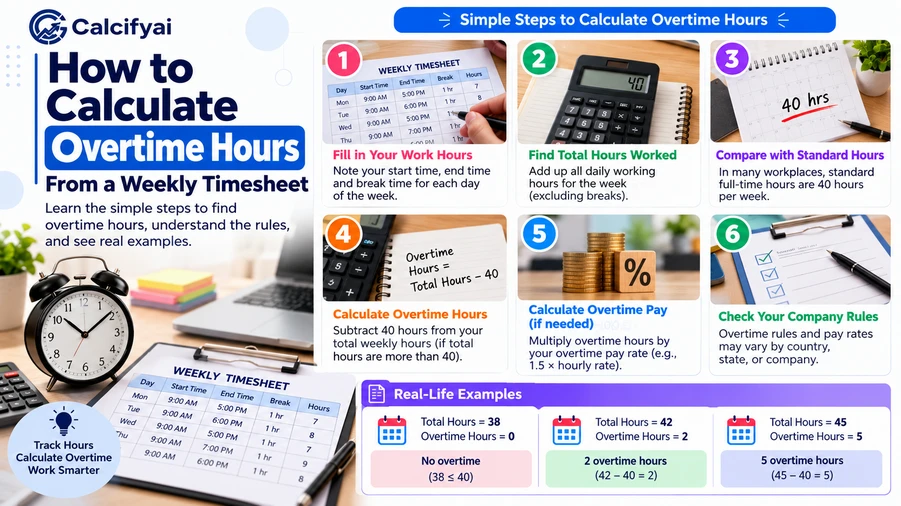
If you are trying to figure out how to calculate overtime hours, start by adding the actual hours worked during the employer's defined workweek. For covered, nonexempt employees under the U.S. Fair Labor Standards Act (FLSA), overtime generally applies to hours worked over 40 in a workweek. The basic formula is:
Overtime Hours = Total Hours Worked − 40
For example, if a weekly timesheet shows 46 hours worked:
46 − 40 = 6 overtime hours
However, calculating overtime correctly can require more than simply adding the daily totals. Unpaid breaks, overnight shifts, split shifts, decimal hours, and the employer's defined workweek can all affect the calculation.
What Are Overtime Hours?
Overtime hours are hours worked beyond the applicable overtime threshold.
Under the federal FLSA, covered non-exempt employees generally must receive overtime pay for hours worked over 40 in a fixed seven-day workweek. Under the federal FLSA, covered non-exempt employees generally must receive overtime pay for hours worked over 40 in a workweek. The U.S. Department of Labor's overtime guidance explains how this rule applies and how overtime pay is calculated. The workweek does not necessarily have to run from Monday through Sunday.
For example:
Total weekly hours: 38 → 0 overtime hours
Total weekly hours: 40 → 0 overtime hours
Total weekly hours: 43 → 3 overtime hours
Total weekly hours: 48 → 8 overtime hours
The key is to calculate the total hours worked in the workweek, rather than automatically treating every hour beyond eight hours in a single day as federal FLSA overtime.
How to Calculate Overtime Hours From a Weekly Timesheet
The easiest method is to work through the timesheet one day at a time.
Step 1: Calculate Each Day's Actual Hours
Start with the employee's clock-in and clock-out times.
The basic formula is:
Hours Worked = End Time − Start Time − Unpaid Breaks
For example, an employee works:
8:00 AM to 5:00 PM
That is 9 hours between the start and end times.
If the employee takes a 1-hour unpaid lunch:
9 − 1 = 8 hours
So the timesheet should show:
8 hours worked
Step 2: Add the Hours for the Entire Week
Suppose the weekly timesheet looks like this:
Day | Hours Worked |
|---|---|
Monday | 8 |
Tuesday | 9 |
Wednesday | 8 |
Thursday | 9 |
Friday | 8 |
Total | 42 |
Now add the daily totals:
8 + 9 + 8 + 9 + 8 = 42 hours
The employee worked 42 hours during the week.
Step 3: Subtract the Overtime Threshold
For a covered nonexempt employee subject to the federal 40-hour FLSA threshold:
Overtime Hours = Total Hours Worked − 40
So:
42 − 40 = 2 hours
The result is:
Regular hours = 40
Overtime hours = 2
Weekly Overtime Formula
You can use this simple formula for a standard 40-hour overtime threshold:
Overtime Hours = MAX(0, Total Weekly Hours − 40)
The MAX function is useful because an employee who works fewer than 40 hours should not have a negative number of overtime hours.
For example:
39 − 40 = −1
But overtime cannot be negative, so:
Overtime Hours = 0
For 45 hours:
45 − 40 = 5
So:
Overtime Hours = 5
Example: Weekly Timesheet With 45 Hours
Imagine an employee has these weekly totals:
Day | Hours |
|---|---|
Monday | 8 |
Tuesday | 9 |
Wednesday | 9 |
Thursday | 10 |
Friday | 9 |
Total | 45 |
Add the hours:
8 + 9 + 9 + 10 + 9 = 45
Now subtract 40:
45 − 40 = 5
Therefore:
Total hours: 45
Regular hours: 40
Overtime hours: 5
This is the basic process for calculating weekly overtime under the federal FLSA framework.
How to Calculate Overtime When Timesheet Entries Include Minutes
Timesheets do not always contain neat whole numbers.
You might see entries such as:
7 hours 30 minutes
8 hours 15 minutes
9 hours 45 minutes
You can calculate these in hours and minutes or convert them to decimal hours.
The conversion formula is:
Decimal Hours = Minutes ÷ 60
For example:
30 ÷ 60 = 0.50
So:
7 hours 30 minutes = 7.50 hours
Likewise:
15 ÷ 60 = 0.25
Therefore:
8 hours 15 minutes = 8.25 hours
For more examples of converting timesheet entries, see this guide on converting minutes to decimal hours for payroll.
Example With Hours and Minutes
Suppose an employee's weekly timesheet shows:
Monday: 8 hours 30 minutes
Tuesday: 8 hours
Wednesday: 9 hours 15 minutes
Thursday: 8 hours 45 minutes
Friday: 8 hours 30 minutes
Convert the minutes:
8:30 = 8.50 hours
8:00 = 8.00 hours
9:15 = 9.25 hours
8:45 = 8.75 hours
8:30 = 8.50 hours
Now add them:
8.50 + 8.00 + 9.25 + 8.75 + 8.50 = 43.00 hours
Then calculate overtime:
43 − 40 = 3 hours
So the employee has:
40 regular hours + 3 overtime hours
How to Handle Unpaid Breaks
Unpaid breaks can affect the total number of hours worked.
Suppose an employee clocks in at 8:00 AM and clocks out at 5:30 PM.
The elapsed time is:
9 hours 30 minutes
The employee takes a 30-minute unpaid lunch.
Therefore:
9 hours 30 minutes − 30 minutes = 9 hours
The timesheet should record 9 hours of work, assuming the break is properly treated as unpaid working time under the applicable rules.
Do not automatically subtract every break. Whether a break counts as working time can depend on the circumstances and applicable law.
How to Calculate Overtime With Different Daily Hours
A common mistake is to calculate overtime separately for each day when the applicable rule is based on the workweek.
Consider this timesheet:
Day | Hours Worked |
|---|---|
Monday | 10 |
Tuesday | 10 |
Wednesday | 10 |
Thursday | 10 |
Friday | 2 |
Total | 42 |
The weekly total is:
10 + 10 + 10 + 10 + 2 = 42 hours
Under the general federal FLSA weekly framework:
42 − 40 = 2 overtime hours
Some state laws and special rules use different overtime standards, so a weekly calculation should not automatically be treated as the only applicable rule.
How to Calculate Overtime for Overnight Shifts
Overnight shifts can make timesheets harder to read because the shift crosses midnight.
For example:
10:00 PM to 6:00 AM
Break the shift into two parts:
10:00 PM to midnight = 2 hours
Midnight to 6:00 AM = 6 hours
Total:
2 + 6 = 8 hours
If the employee takes a 30-minute unpaid break:
8 − 0.5 = 7.5 hours
So the shift contributes 7.5 hours to the weekly total.
When calculating overtime, add the actual hours worked according to the employer's workweek rather than assuming the calendar date determines the workweek.
How to Calculate Overtime From a Weekly Timesheet in Decimal Hours
Decimal hours can make weekly totals easier to calculate.
Suppose a timesheet contains:
Day | Decimal Hours |
|---|---|
Monday | 8.50 |
Tuesday | 8.75 |
Wednesday | 9.00 |
Thursday | 8.25 |
Friday | 8.50 |
Total | 43.00 |
Add the values:
8.50 + 8.75 + 9.00 + 8.25 + 8.50 = 43.00
Then:
43.00 − 40 = 3.00
So the employee worked 3 overtime hours under a 40-hour weekly threshold.
How to Calculate Overtime Pay
Once you know the overtime hours, you may also want to estimate overtime pay.
For a covered, nonexempt employee subject to the standard federal FLSA overtime rule, overtime is generally paid at at least 1.5 times the regular rate for qualifying hours over 40.
The simple calculation is:
Overtime Rate = Regular Hourly Rate × 1.5
For example, if the regular rate is $20 per hour:
$20 × 1.5 = $30 per hour
If the employee has 4 overtime hours:
4 × $30 = $120
So the overtime portion would be $120, before considering any other payroll calculations or applicable rules.
The actual regular rate can be more complicated for some employees, especially when compensation includes different types of earnings.
Use a Work Hours Calculator to Check Your Timesheet
Manually adding several days of hours can lead to small mistakes, especially when a timesheet includes breaks, minutes, or overnight shifts.
A Work Hours Calculator can help calculate daily and weekly work hours while accounting for breaks and overtime.
A typical workflow is:
Enter the start time.
Enter the end time.
Enter applicable break time.
Calculate each day's working hours.
Add the weekly hours.
Compare the total with the applicable overtime threshold.
Separate regular and overtime hours.
For a quick check, always compare the calculator's result with the original timesheet entries.
Common Mistakes When Calculating Overtime Hours
1. Using the Calendar Week Instead of the Employer's Workweek
The FLSA defines a workweek as a fixed and regularly recurring period of 168 hours, or seven consecutive 24-hour periods. It does not have to be Monday through Sunday.
2. Forgetting Unpaid Breaks
If a break should not be counted as working time, failing to subtract it can inflate the weekly total.
3. Treating Minutes as Decimal Numbers
Thirty minutes is not 0.30 hours.
It is:
30 ÷ 60 = 0.50 hours
So 8 hours and 30 minutes is 8.50 hours, not 8.30.
4. Automatically Treating Every Weekend Hour as Overtime
Working on a Saturday, Sunday, or holiday does not by itself create federal FLSA overtime. The federal rule generally looks at qualifying hours worked over 40 in the workweek.
State or employer-specific rules may differ.
5. Rounding Too Early
Keep the original hours and minutes until you have completed the daily calculations. Convert to decimal hours afterward when needed.
6. Assuming Every Employee Uses the Same Overtime Rule
Employee classification, state law, industry-specific rules, and exemptions can affect overtime requirements. The federal 40-hour rule is not a universal rule for every worker.
Quick Overtime Examples
Example 1: 38 Hours
38 − 40 = −2
Overtime:
0 hours
Example 2: 40 Hours
40 − 40 = 0
Overtime:
0 hours
Example 3: 44 Hours
44 − 40 = 4
Overtime:
4 hours
Example 4: 47.5 Hours
47.5 − 40 = 7.5
Overtime:
7.5 hours
Example 5: 52 Hours
52 − 40 = 12
Overtime:
12 hours
Frequently Asked Questions
How do I calculate overtime hours?
Add all qualifying hours worked during the applicable workweek. For a covered, nonexempt employee under the general federal FLSA rule, subtract 40 from the weekly total if the total is above 40.
Overtime Hours = Total Weekly Hours − 40
Is overtime calculated daily or weekly?
Under the general federal FLSA rule, overtime for covered, nonexempt employees is generally based on hours worked over 40 in a workweek. Some state laws and special rules may use different standards.
What if I worked exactly 40 hours?
If the applicable federal threshold is 40 hours, exactly 40 hours produces:
40 − 40 = 0 overtime hours
What if I worked 45 hours?
Using the general federal 40-hour threshold:
45 − 40 = 5 overtime hours
Is 30 minutes equal to 0.30 overtime hours?
No. Thirty minutes equals 0.50 decimal hours.
30 ÷ 60 = 0.50
Does working on Saturday automatically count as overtime?
Not under the general federal FLSA rule. Weekend work can be regular time unless the employee's total qualifying hours exceed the applicable overtime threshold or another rule applies.
Can overtime rules vary by state?
Yes. State overtime laws can provide different requirements, and some employees or industries are subject to special rules. Always check the rules that apply to the employee and workplace.
Final Takeaway
Learning how to calculate overtime hours from a weekly timesheet becomes much easier when you follow a consistent process:
Calculate each day's actual working time.
Subtract applicable unpaid breaks.
Convert minutes to decimal hours if necessary.
Add all qualifying hours within the employer's defined workweek.
Compare the weekly total with the applicable overtime threshold.
For the general federal FLSA rule, calculate hours over 40 as overtime for covered, nonexempt employees.
Apply the appropriate overtime pay rate if you also need to calculate earnings.
Disclaimer
The information provided in this article is for educational and informational purposes only. It should not be considered as professional financial, medical, or legal advice. Always consult with qualified professionals for specific guidance related to your situation.
Popular Calculators
Explore our most-used free calculators for finance, health, and everyday needs.