
Why Do Calculators Round Large Numbers?
Learn why calculators round large numbers, how rounding works, and how precision, truncation, scientific notation, and floating-point numbers affect results.
Calcifyai Team
Expert calculators & financial tools
Have you ever entered a very large number into a calculator and noticed that the answer looks slightly different from what you expected?
For example, you might enter a long number with many digits and get an answer with fewer digits. This can happen because calculators and computer systems often have limits on how many digits they can store or display at once.
Calculators round large numbers to manage precision, display results clearly, and work within the limits of their numerical systems. Rounding does not always mean the calculator made a mistake. In many cases, it is simply showing an approximation of a value that has more digits than the display or calculation format can handle.
Understanding why this happens can help you tell the difference between a rounded result, a precise result, and an actual calculation error.
What Does It Mean When a Calculator Rounds a Number?
Rounding means replacing a number with a nearby value that has fewer digits.
For example:
1,234,567.89 → 1,234,568
The original number has more detail, while the rounded number is easier to read and use.
A calculator may round numbers because of:
Display limitations
Precision limits
Floating-point representation
Very long decimal results
Large or very small numerical values
The rounding setting selected by the user
The goal is usually to provide a useful result without displaying unnecessary digits.
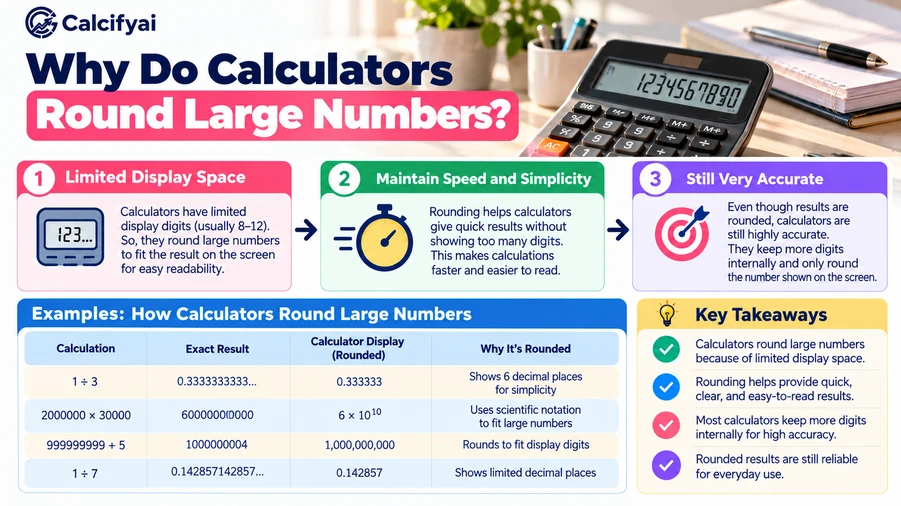
Why Do Calculators Round Large Numbers?
There are several reasons a calculator may round a large number.
Limited Display Space
A calculator screen can only show a certain number of characters.
Imagine a result such as:
123456789012345678901234567890
Displaying every digit may not be practical on a small screen.
Instead, a calculator might display the number in a shorter form or use scientific notation.
For example:
1.2345678901234568 × 10²⁹
The value is still represented, but the display uses fewer characters.
Limited Numerical Precision
Calculators and computers store numbers using specific numerical formats.
These formats have limits on how many digits can be represented accurately.
For example, a system may be able to store only a certain number of significant digits. If a calculation produces more digits than the system can represent, some digits may be rounded.
This is especially important when working with extremely large numbers or calculations involving many decimal places.
Long Decimal Results
Some mathematical operations produce decimals that continue indefinitely.
For example:
1 ÷ 3 = 0.333333333333...
There is no final digit.
A calculator cannot display an infinite number of digits, so it must stop somewhere:
0.333333
or:
0.3333333333333333
The number of displayed digits depends on the calculator and its precision.
How Does Calculator Rounding Work?
The basic rounding process is simple.
Suppose you want to round:
48,726
to the nearest thousand.
First, identify the digit you want to keep:
48,000
Then look at the next digit.
The next digit is 7.
Because 7 is 5 or greater, the thousands digit increases by 1.
So:
48,726 → 49,000
If the next digit were less than 5, the previous digit would normally stay the same.
For example:
48,326 → 48,000
This is the basic idea behind standard rounding.
What Happens When a Calculator Rounds a Large Number?
Consider this number:
987,654,321,987
Suppose a calculator displays only six significant digits.
It may show approximately:
987,654,000,000
The displayed number is not necessarily the exact original value. It is a rounded representation.
This matters when you use the displayed result in another calculation.
If you copy a rounded number instead of using the calculator's full internal result, you may introduce additional error.
Why Do Some Calculators Show Scientific Notation?
Scientific notation is useful for displaying very large numbers in a compact form.
For example:
1,000,000,000
can be written as:
1 × 10⁹
A much larger number such as:
5,000,000,000,000,000
can be written as:
5 × 10¹⁵
Scientific notation makes large numbers easier to read and reduces the number of zeros you need to count.
CalcifyAI's guide on how to convert numbers into scientific notation explains how this format works and how to convert large numbers step by step.
Does Rounding Mean the Calculator Is Wrong?
Not necessarily.
A rounded result can still be a correct representation of the original calculation.
For example:
The exact result:
12,345.67891
Rounded to two decimal places:
12,345.68
The calculator has not necessarily made an error. It has simply reduced the number of digits.
The important question is whether the level of rounding is appropriate for the calculation.
For a simple estimate, two decimal places may be enough.
For a scientific or financial calculation, you may need more precision.
Rounding vs Truncation
Rounding and truncation are not the same.
Rounding
Rounding looks at the next digit and decides whether the last retained digit should change.
For example:
7.86 rounded to one decimal place becomes:
7.9
Truncation
Truncation simply removes the extra digits.
For example:
7.86 truncated to one decimal place becomes:
7.8
The difference may seem small, but it can become important when calculations are repeated many times.
How Many Digits Can a Calculator Handle?
There is no single answer.
Different calculators, programming languages, apps, and numerical systems use different representations and precision limits.
Some basic calculators may display only a limited number of digits.
Scientific calculators may provide more digits.
Computer software can use different numerical formats, including fixed-precision, floating-point, and arbitrary-precision arithmetic.
For example, arbitrary-precision systems allow calculations to use a selected number of digits rather than relying only on a fixed precision. This is useful when standard numerical representations are not sufficient.
What Is Floating-Point Rounding?
Many computer systems represent numbers using floating-point formats.
Floating-point numbers store values using a combination of significant digits and an exponent.
This makes it possible to represent both very large and very small numbers efficiently.
However, not every decimal number can be represented exactly in a binary floating-point format.
This can produce results that look surprising.
For example, a calculation that appears simple mathematically may internally produce a value slightly above or below the exact result.
The displayed answer may then be rounded to make it easier to read.
Why Rounding Can Become Important in Repeated Calculations
Rounding once may create only a very small difference.
But repeated rounding can sometimes create a larger difference.
Consider a calculation that produces:
10.666666...
If you round it to:
10.67
and then continue using 10.67 in several later calculations, each calculation is based on an approximation.
For this reason, it is often better to keep additional precision during intermediate calculations and round the final answer when appropriate.
Should You Round Before or After Calculating?
In many situations, it is better to calculate with the available precision first and round the final result afterward.
For example, suppose a calculation produces:
245.67891
If you need the answer to two decimal places:
245.67891 → 245.68
Instead of rounding every intermediate number, keep the extra digits until the final step when possible.
This can reduce accumulated rounding differences.
However, the correct approach depends on the specific calculation, rules, and required precision.
How to Round Large Numbers Step by Step
You can use the following simple process.
Step 1: Identify the Place Value
Decide whether you want to round to the nearest:
Ten
Hundred
Thousand
Million
Billion
Decimal place
Significant figure
Step 2: Find the Next Digit
Look at the digit immediately after the place you want to keep.
Step 3: Apply the Rounding Rule
If the next digit is 5 or greater, increase the retained digit by 1.
If it is less than 5, leave the retained digit unchanged.
Step 4: Replace the Remaining Digits
For whole numbers, the digits after the selected place become zeros.
Example
Round:
7,846,291
to the nearest million.
The number is:
7,846,291
The millions digit is 7.
The next digit is 8.
Since 8 is greater than 5, increase 7 to 8.
Result:
8,000,000
Common Mistakes When Working With Rounded Numbers
Assuming Every Displayed Number Is Exact
A displayed result may be rounded.
Check the calculator's precision or display settings when exact digits matter.
Rounding Too Early
Rounding intermediate results can introduce unnecessary differences.
Keep additional digits during the calculation when appropriate.
Confusing Rounding With Truncation
Rounding considers the next digit.
Truncation simply removes digits.
Ignoring Significant Figures
Decimal places and significant figures are not the same.
For example, 2.50 has three significant figures, while 2.5 has two.
Treating Scientific Notation as Rounding
Scientific notation changes how a number is written, but it does not automatically mean the number has been rounded.
For example:
5,000,000 = 5 × 10⁶
Both represent the same exact value.
When Should You Use a Rounding Calculator?
A rounding calculator can be useful when you need to consistently round numbers to a specific precision.
You might use one for:
Large numbers
Decimal places
Significant figures
Financial values
Measurements
Scientific calculations
Data reporting
Pricing
Estimates
For example, CalcifyAI's Rounding Calculator supports decimal places, significant figures, nearest increments, rounding, floor, ceiling, and truncation.
Why Does Rounding Matter in Finance and Science?
Rounding can affect how numerical information is reported.
In finance, currency is often displayed to a fixed number of decimal places.
In science and engineering, measurements may be reported using a specific number of significant figures.
In data analysis, large datasets may contain many digits, but reports often show only the precision that is useful.
The key is to choose a level of precision that matches the purpose of the calculation.
How to Keep Large-Number Calculations More Accurate
If accuracy matters, a few simple habits can help.
Keep Extra Digits During Calculations
Avoid rounding every intermediate result unless the calculation requires it.
Round at the Final Step
When possible, calculate first and round the final result.
Check the Calculator's Settings
Some calculators allow you to choose decimal places, significant figures, or display modes.
Understand the Number Format
If you are using software or a programming language, learn whether it uses floating-point or arbitrary-precision arithmetic.
Use Appropriate Precision
More digits are not always better. The right precision depends on what you are measuring or calculating.
Frequently Asked Questions
Why do calculators round large numbers?
Calculators round large numbers because they have limits on display space and numerical precision. Rounding lets them represent or display long results in a practical format.
Does calculator rounding change the answer?
Rounding changes the displayed or represented value slightly, but it does not necessarily mean the original calculation was incorrect.
Why does my calculator show a different answer after a long calculation?
The calculator may be displaying a rounded result, or the calculation may involve a numerical representation with limited precision.
Is rounding the same as truncation?
No. Rounding looks at the next digit and may increase the retained digit. Truncation simply removes the extra digits.
Should I round intermediate calculations?
Usually, it is better to keep additional precision during intermediate calculations and round the final answer when appropriate.
Why do calculators use scientific notation for large numbers?
Scientific notation allows very large numbers to be displayed in a shorter and easier-to-read form.
Can a calculator show every digit of a large number?
Not always. The number of digits a calculator can display or calculate accurately depends on its design and numerical representation.
Does more precision always mean a more accurate answer?
No. Precision refers to the number of digits represented, while accuracy refers to how close the result is to the true value.
Final Takeaway
Calculators round large numbers mainly because numerical systems and displays have practical limits.
A long calculation may produce more digits than a calculator can display or represent with its chosen precision. Rounding provides a shorter, more manageable approximation.
The important thing is to understand when rounding happens and how much precision you need.
For everyday calculations, a rounded result is often perfectly useful. For scientific, financial, engineering, or high-precision work, keeping extra digits during calculations and rounding at the appropriate stage can help reduce unnecessary errors.
The U.S. National Institute of Standards and Technology (NIST) provides detailed rounding rules for numerical values and significant digits, which is useful when a calculation requires consistent rounding practices.
Disclaimer
The information provided in this article is for educational and informational purposes only. It should not be considered as professional financial, medical, or legal advice. Always consult with qualified professionals for specific guidance related to your situation.
Popular Calculators
Explore our most-used free calculators for finance, health, and everyday needs.